






















 Search
 slovenčina

























 Login
Login


EnviroMail 73 Canada
Field-Ready Bottle Order / Pre-Filled COC and Cost Estimate Saves Time and Reduces Errors
ALS is excited to present an innovative, industry leading approach to the laboratory bottle order and sample submission workflow, designed to support efficient project execution.
Fig 1. Cooler with Pre-Labelled Sample Bottles

We listened to client feedback and redesigned our process to reduce field time, minimize transcription and labeling errors, and accelerate sample login and processing at the laboratory. Using the new Workorder Pre-Login feature in ALS Solutions, ALS will do most of the work for you, so you can focus on sample collection and delivery logistics. These features improve and seamlessly integrate the ALS Solutions online bottle order system and eCOC (electronic chain of custody) features that were introduced in EnviroMail 65 and EnviroMail 66.
Pre-Labelled Bottles Save Field Time and Prevent Misinterpretations
Our new system makes it easy to pre-label sample containers, avoiding struggles with handwriting labels in poor weather or pre-writing labels in the office prior to sampling. It’s as simple as preparing a COC – copy from an Excel file, paste into our Sample Registration system, and select the tests you need – we take it from there! We can directly print your labels and prepare a pre-labelled bottle order from your Sample Registration. No more scribbling of sample IDs on a paper COC. Everything is submitted digitally with no chance of misinterpreting 1's as I's, 0's as O's, or 5's as S's.
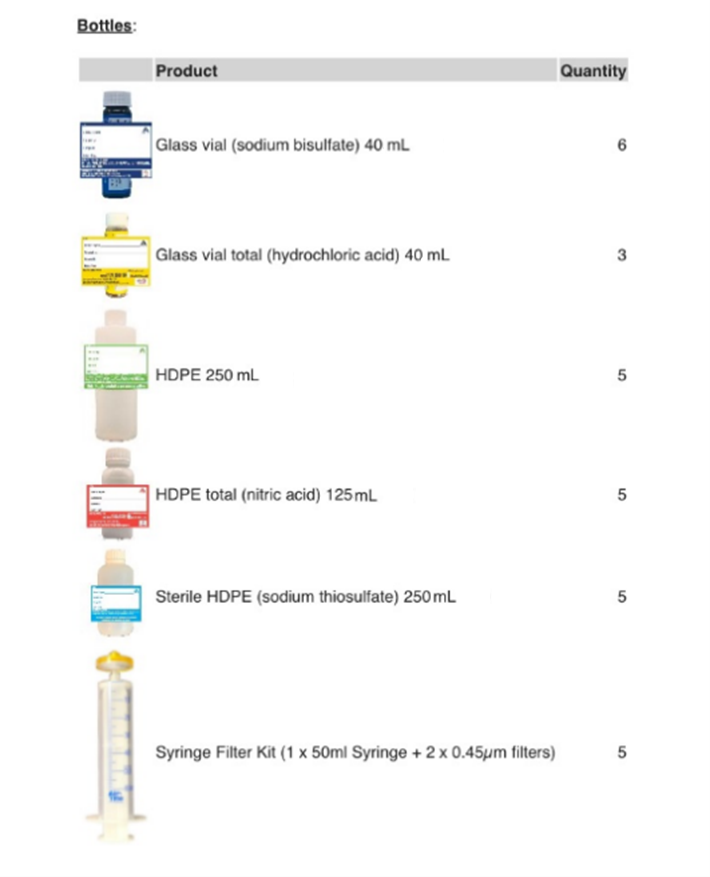
Fig 2. Detailed Bottle Order Checklist Included with Pre-Labelled Sample Bottles
Fully Traceable Bottle Order and COC Submission
The guiding principle behind our bottle order and sample submission workflow design was to reduce errors and combine a bottle order and eCOC submission with a single chain-of-custody form. Bottle order, COC, and results are all traceable in ALS Solutions. Email notifications keep you updated throughout the process. Test results will be available as soon as they are authorized by the lab.
The number one cause of amended reports and sample integrity comments is erroneous interpretation of handwriting on bottles and COCs. Our new workflow virtually eliminates the requirement to interpret handwriting. Your results are right the first time, without having to clarify sample IDs or unclear submission requests. The second component that impacts quality is requesting the correct analytical tests, which is improved when your project planner selects test items directly from your quote, which has been configured with the correct bottles, preservatives, and test options to meet your needs, and to help ensure regulatory compliance.
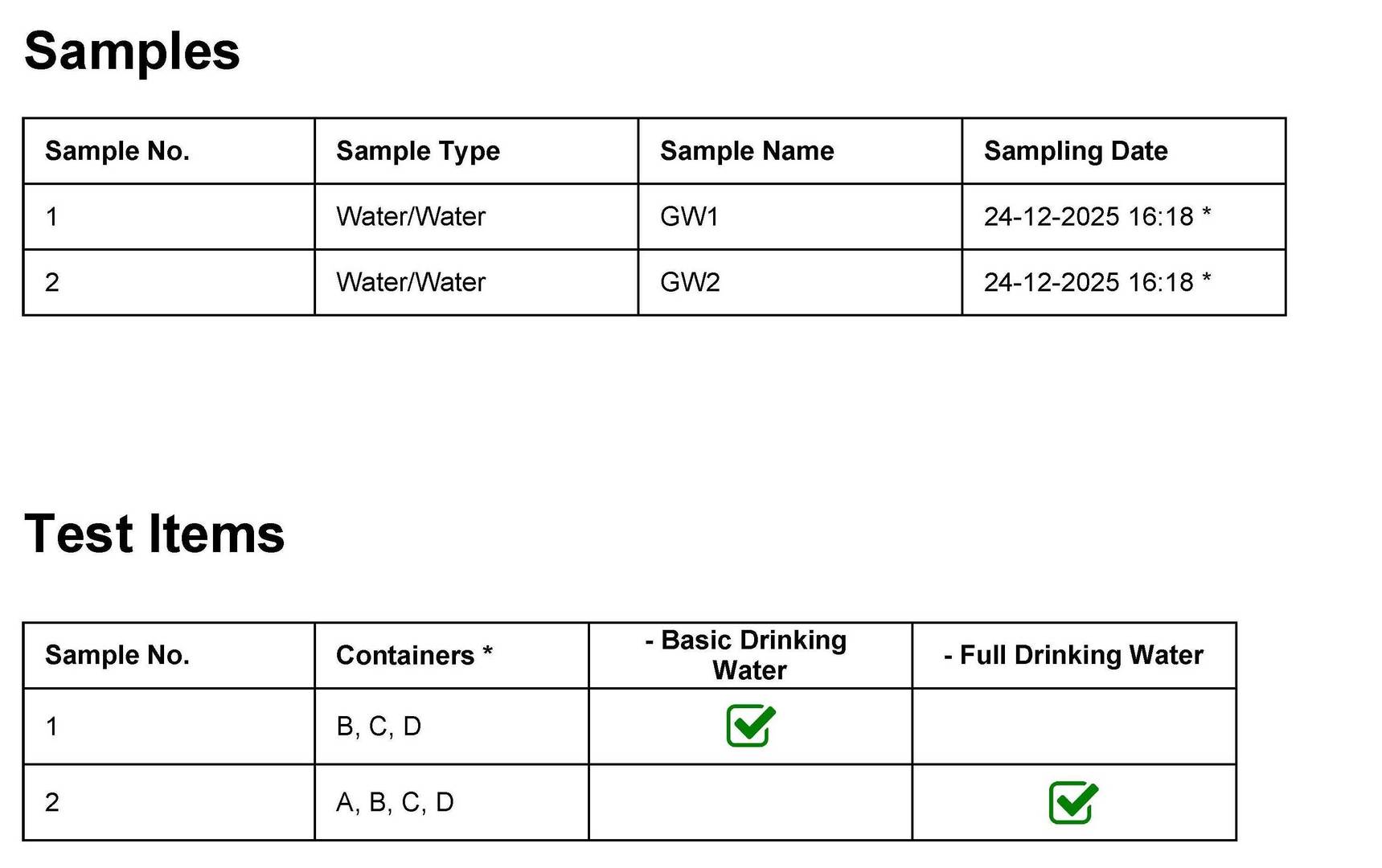
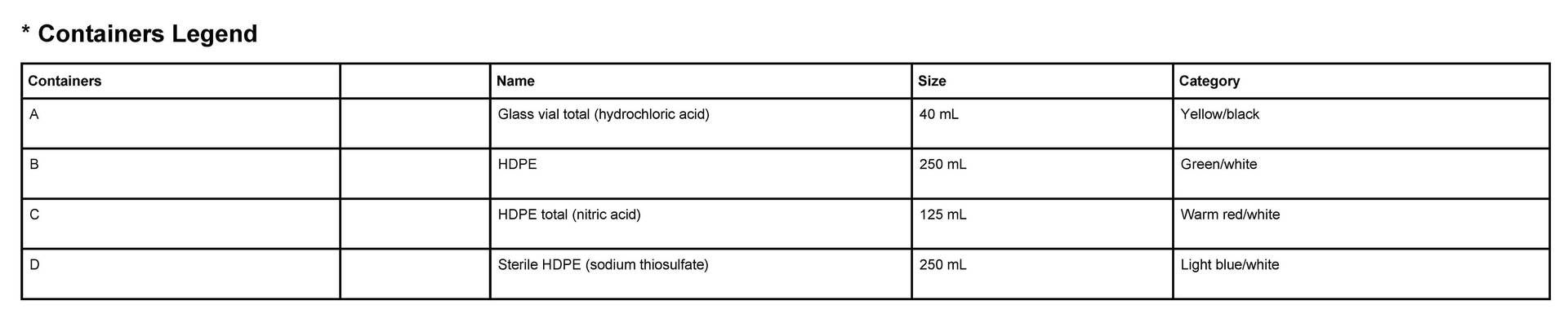
Fig 3. Excerpts from new combined Bottle Order and COC form showing linkages between Samples, Test Items, and Containers
Faster Login and Processing at the Lab
When samples are registered in ALS Solutions, the submission is ported directly into our Laboratory Information Management System (LIMS), which speeds up the process of identifying samples with short hold times, and increases the speed in which Sample Receipt Notifications (SRNs) are issued. This allows you to review your submission sooner to catch any potential errors or omisions, increasing the probability that you get the tests you need within hold times.
Provisional Cost Estimate
Our new system may optionally provide you with a Provisional Cost Estimate when you submit your bottle order request. The Cost Estimate may be used for a PO and includes shipping fees, taxes, and miscellaneous charges, but is based on routine TAT and does not include rush surcharges.
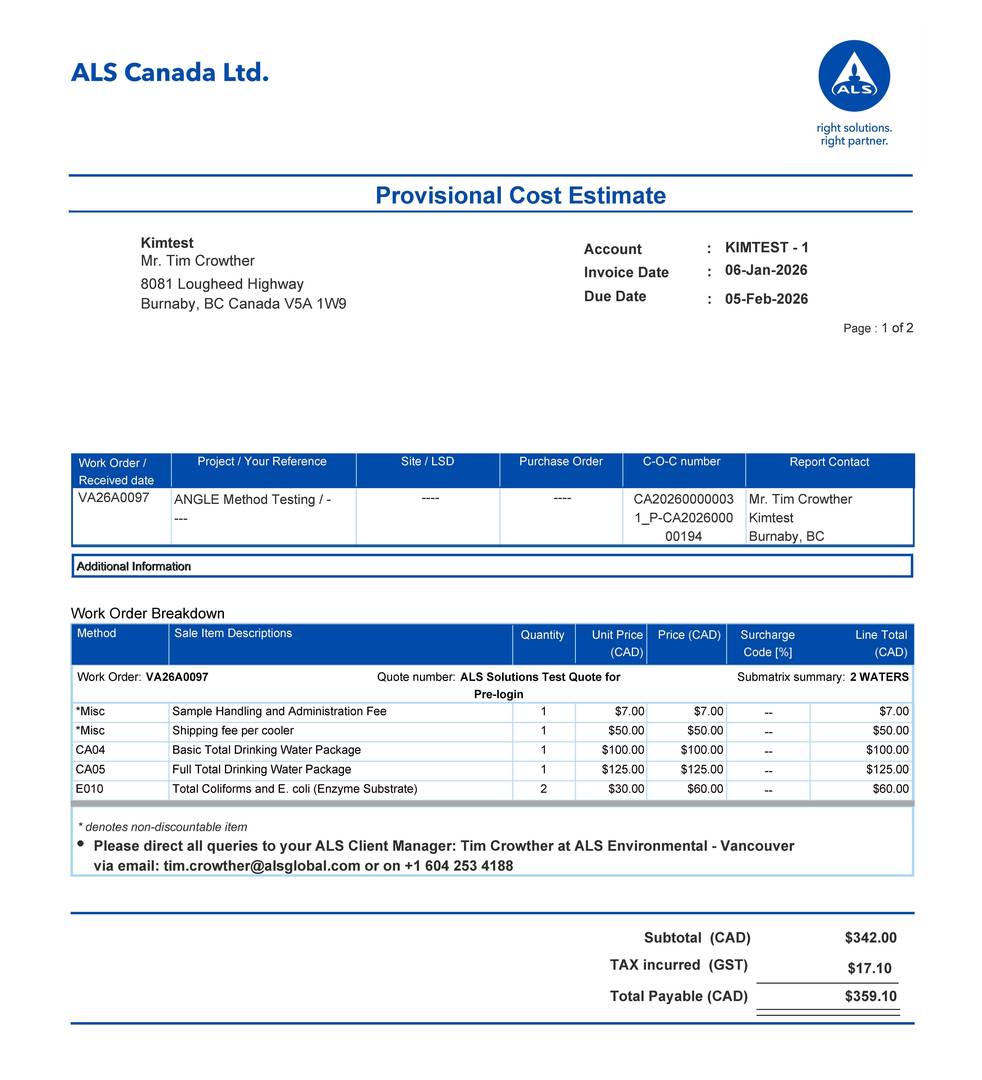
Fig 4. Provisional Cost Estimate
New ALS Solutions Streamlined Workflow
Figure 5 outlines the six steps required to create a new Product Order Request with pre-labelled bottles and pre-filled eCOCs.
Step 1: Add a Product Order using the Work Orders (Pre-Login) option.
Step 2: Add new or copy existing Work Order (eCOC) or Work Order (eCOC) Template.
Step 3: Make any required changes, such as TAT priority, Sampling Dates/Times and Test Items.
Step 4: Save and close the eCOC to generate a list of bottles required for each sample. The bottles will be listed on the Product Order Report with the bottle order type (e.g., HDPE, Amber Glass, etc.), volume and quantity of container, and a photo of the bottle (see Figure 2), and also on the eCOC Report. ALS completes bottle order and arranges shipment.
Step 5: Receive pre-labelled sample bottles in a cooler along with a pre-filled paper COC form (printed version of the eCOC already pre-loaded into the ALS LIMS). Any last minute changes can be hand-written on the paper COC along with sampling dates and times, and returned with the cooler in the bag provided. Our Client Services team will always update the eCOC information already in the LIMS with any changes written on the pre-filled paper COC accompanied with the submission.
Step 6: Deliver collected samples to ALS and review the SRN immediately to ensure all requests have been confirmed.
If the Sampling Event is repeated in the future, the process becomes even faster as most of the information (except for sampling dates/times) can be copied or created in a WO template for future use.
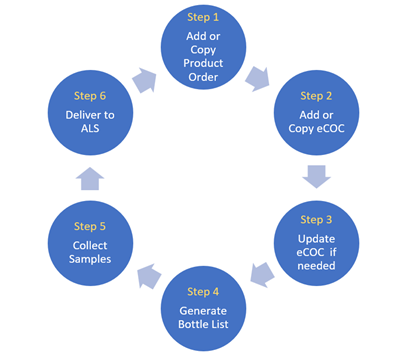
Fig 5. New ALS Solutions Streamlined Workflow
Frequently Asked Questions
Can I modify samples after submission?
Yes. Contact your ALS Project Manager to adjust labels/eCOC before sampling, or record changes on the eCOC after sampling.
Can multiple quotes be used under one bottle order?
Yes. Multiple quotes and registrations can be associated under a single order; ensure correct selections in Sample Registration.
How do I handle special matrices or uncommon tests?
Add details in Notes and consult your ALS Project Manager to confirm bottle types, preservation, and method availability, or to update your project quote. Quotes can be updated with new testing and bottle requirements and made available in ALS Solutions within minutes.
Will bottle counts and preservatives be provided automatically?
Yes. Bottle requirements are generated from selected matrices and test items during Sample Registration.
Steps to Start Using These Features
To get started with our new integrated bottle order and eCOC features, please contact your Project Manager or Technical Sales Representative to receive initial training and support.
Confirm your quote is setup correctly and that you have the correct quote reference.
Prepare your sample names in Excel for fast copy/paste transfer to your eCOC.
Submit your first Product Order and send an email to your ALS Project Manager to review. Please provide feedback to ALS on how we can improve!
For more information and training on these streamlined features, please reach out to your ALS Project Manager or Technical Sales Representative.